Windows 11's Secret Run Dialog: A Glimpse into Microsoft's Modernization Paradox
Windows 11 is quietly refining a hidden, modern version of its classic Run dialog, signaling a subtle but significant design shift. While users eagerly await its public rollout, this development highlights Microsoft's ongoing challenge to modernize legacy features without disrupting user experience. The unreleased Run dialog offers a glimpse into the future of Windows UI, even as older elements persist.
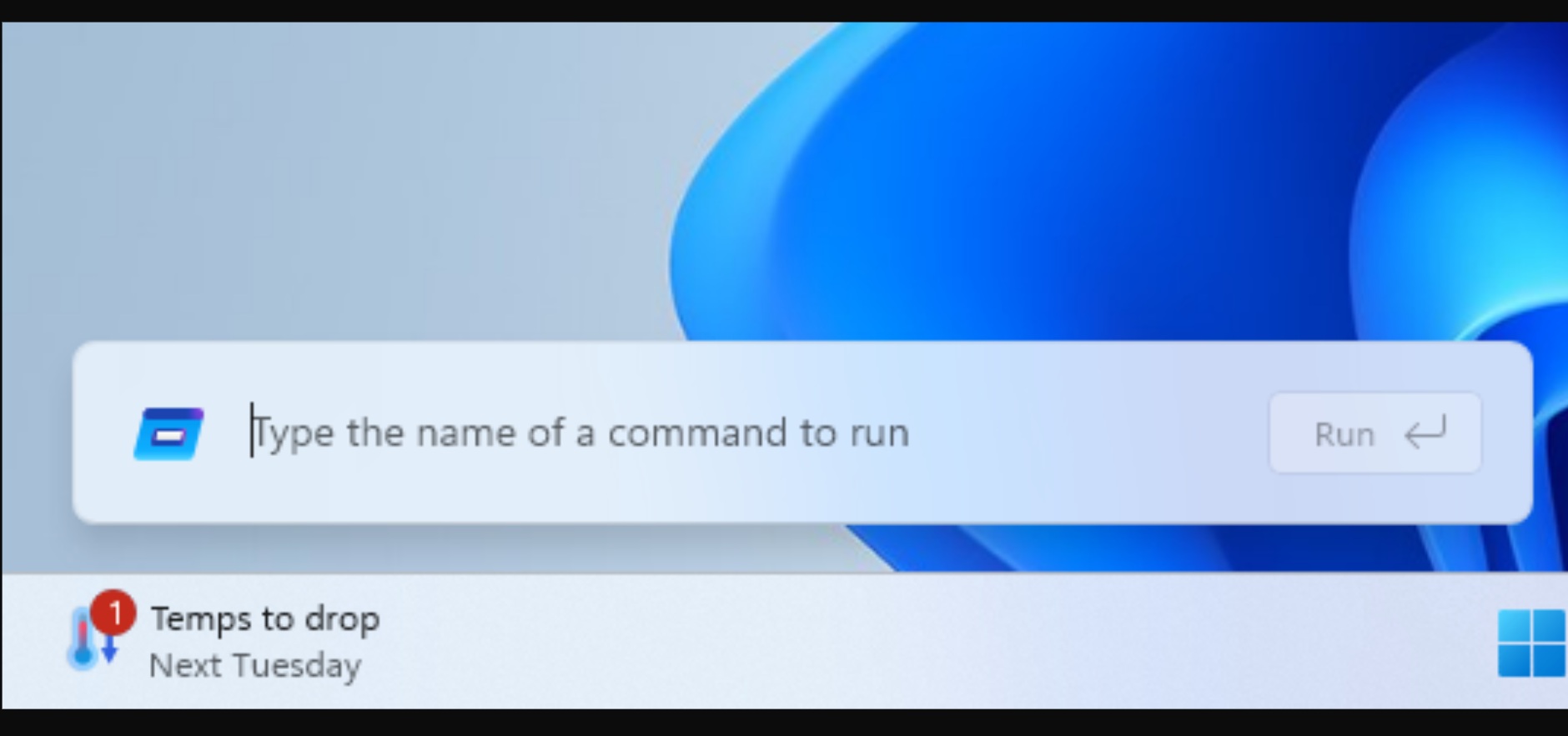
In the ever-evolving landscape of operating systems, few features are as ingrained and universally recognized as Windows' Run dialog. Activated by the venerable Win + R shortcut, this simple command-line interface has been a cornerstone of quick system access for decades. Yet, in an era dominated by sleek, modern UIs and touch-friendly interfaces, the Run dialog has remained stubbornly, charmingly, anachronistic. Until now, it seems. Whispers from the digital ether suggest that a modern, redesigned version of this iconic utility is not only in the works but is quietly undergoing a significant aesthetic refresh, even as its public debut remains elusive.
This development is more than just a minor UI tweak; it's a fascinating microcosm of Microsoft's broader struggle and ambition with Windows 11. The company aims to deliver a cohesive, modern experience, yet it's tethered to decades of legacy code and user expectations. The fact that a revamped Run dialog is being polished behind the scenes, while other, arguably more prominent, legacy dialogs (like the Properties tab in File Explorer) remain untouched, speaks volumes about Microsoft's internal priorities and the complex roadmap for its flagship OS.
The Unseen Evolution: A Modern Run Dialog's Journey
The existence of a modern Run dialog isn't entirely new news to keen-eyed Windows insiders and tech enthusiasts. It has been spotted in various development builds, often hidden behind experimental flags or accessible only through unconventional means. What is new, and particularly intriguing, is the recent discovery of its continued refinement. Reports indicate that this unreleased version is receiving a slimmer design, aligning more closely with Windows 11's Fluent Design principles – think rounded corners, subtle animations, and a generally more polished aesthetic that contrasts sharply with its utilitarian, Windows 95-era predecessor. This isn't just a skin-deep change; it implies a re-engineering of the dialog's underlying components to integrate seamlessly with the modern Windows shell.
For years, the classic Run dialog has served its purpose admirably. It's fast, lightweight, and requires minimal system resources. Its strength lies in its simplicity: a text box, an 'OK' button, a 'Cancel' button, and a 'Browse' option. This minimalist approach has made it indispensable for IT professionals, developers, and power users alike, offering direct access to system utilities, applications, and network paths without navigating through multiple menus. The challenge for Microsoft is to modernize this utility without compromising its core strengths. A modern Run dialog could potentially offer enhanced features like command history with richer context, intelligent auto-completion, or even integration with Windows Search, elevating it beyond a mere command launcher.
Microsoft's Modernization Paradox: Legacy vs. Innovation
Microsoft's journey with Windows 11 has been defined by a constant tension between retaining compatibility with its vast ecosystem of hardware and software, and pushing forward with a truly modern operating system. This modernization paradox is evident throughout the OS. While the Start Menu, Taskbar, and Settings app have received significant overhauls, many deeper system components, dialogs, and control panels retain their vintage appearance and functionality. This creates an inconsistent user experience, often jarring users as they transition from a sleek, new interface to an old, pixelated one.
Consider the Control Panel. Despite Microsoft's efforts to migrate its functionalities to the Settings app, the Control Panel stubbornly persists, a testament to the sheer volume of legacy options and configurations it houses. Similarly, the Device Manager, Disk Management, and various Properties dialogs across File Explorer still sport interfaces that would look familiar to a Windows XP user. The quiet development of a modern Run dialog, while these more frequently accessed legacy elements remain, suggests a strategic, perhaps even cautious, approach to modernization. It's possible that the Run dialog, being a relatively isolated and self-contained component, is an easier target for a full-scale redesign compared to deeply intertwined elements like File Explorer's property sheets.
Implications for Users and the Future of Windows UI
What does this mean for the average Windows 11 user? Primarily, it signifies Microsoft's long-term commitment to a unified design language. While the rollout isn't imminent, the continuous refinement of this hidden Run dialog indicates that it's not a forgotten project. When it eventually sees the light of day, it will contribute to a more cohesive and visually appealing user experience, reducing the 'Frankenstein OS' feel that some users currently report.
For power users, the potential for enhanced functionality within a modern Run dialog is exciting. Imagine a Run dialog that remembers not just recent commands, but also offers intelligent suggestions based on usage patterns, or even integrates with cloud services. The Windows Terminal, for instance, has demonstrated how a modern approach can revitalize a classic command-line interface, offering tabs, customization, and improved performance. A modern Run dialog could follow a similar trajectory, becoming a more powerful and intuitive tool.
However, the slow pace of this rollout also raises questions about Microsoft's ability to execute its modernization vision efficiently. The tech world moves rapidly, and users expect consistent updates and improvements. The fact that a redesigned Run dialog has been in development for an extended period without a public release could be attributed to thorough testing, ensuring backward compatibility, or simply resource allocation challenges within Microsoft's vast development teams. It underscores the monumental task of updating an operating system used by billions, where even minor changes can have widespread ramifications.
The Road Ahead: A Unified Windows Experience?
The journey of Windows 11's modern Run dialog is a compelling narrative in Microsoft's ongoing quest for a unified, modern operating system. It serves as a subtle indicator of the company's design philosophy and its methodical, albeit slow, approach to overhauling its core components. While the wait continues, the quiet refinements suggest that when this modernized Run dialog finally makes its public debut, it will be a polished and well-integrated addition to the Windows 11 experience.
Ultimately, the success of Windows 11 will hinge on its ability to seamlessly blend its innovative features with its enduring legacy. The modern Run dialog, though small in scope, is a crucial piece of this larger puzzle. Its eventual release will not only provide a more aesthetically pleasing and potentially more functional utility but will also serve as a benchmark for how effectively Microsoft can bridge the gap between its past and its future, delivering a truly cohesive and modern computing experience for its global user base. The anticipation builds, not just for a new dialog, but for a clearer vision of Windows' future.
Stay Informed
Get the world's most important stories delivered to your inbox.
No spam, unsubscribe anytime.
Comments
No comments yet. Be the first to share your thoughts!