Unmasking the CPU Meter: The Hidden 'Obituary' of Your PC's Past Performance
Delve into the fascinating, often misunderstood world of Windows Task Manager's CPU usage meter. This article reveals how this ubiquitous tool functions as a 'moving obituary' of your computer's immediate past, not a real-time snapshot. Explore the intricate dance of kernel calls, timers, and averaging that shapes what you see, and understand its profound implications for system diagnostics and user perception. Discover the engineering brilliance and the inherent limitations behind this digital window into your PC's soul.
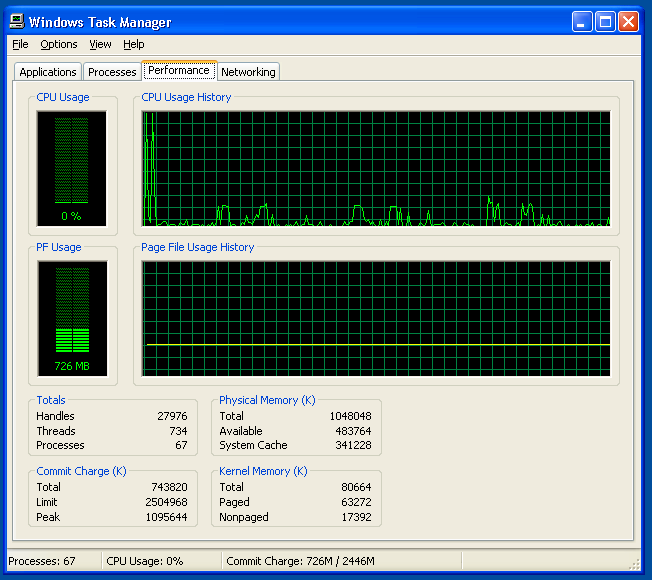
Every Windows user, at some point, has stared intently at the Task Manager's CPU usage meter, a digital heartbeat fluctuating with the demands placed upon their machine. It's a familiar sight, often consulted in moments of frustration when a system lags, or curiosity when a new application is launched. Yet, despite its omnipresence, few truly understand what this seemingly straightforward percentage actually represents. It's not a live, instantaneous snapshot of your CPU's current state, but something far more nuanced and, as former Microsoft engineer Dave Plummer eloquently put it, a "moving little obituary for the immediate past." This revelation, often surprising to even seasoned tech enthusiasts, unravels a complex interplay of timers, kernel calls, and statistical averaging that defines our perception of system performance.
The Illusion of the Instant: How the CPU Meter Really Works
The fundamental misconception about the Task Manager's CPU meter is that it provides a real-time, instantaneous reading. In reality, the CPU is an incredibly fast component, executing billions of instructions per second. A truly instantaneous reading would be a blur of 0% and 100%, utterly useless for human comprehension. Instead, what you see is an averaged value over a short, predefined period. This averaging is crucial for providing a stable, digestible metric. Imagine trying to track the exact speed of a Formula 1 car every millisecond; you'd get a chaotic stream of numbers. Instead, we look at average lap times or speed over a segment.
Dave Plummer, a veteran of Microsoft's Windows kernel development, shed light on this intricate process. He explained that the system doesn't measure CPU usage by constantly polling the processor. Instead, it relies on a timer-based approach. The operating system, specifically the kernel, keeps track of how much time the CPU spends executing user-mode code (applications) versus kernel-mode code (OS functions) versus being idle. At regular intervals, typically every second or so, the Task Manager queries the kernel for these accumulated statistics. It then calculates the percentage of time the CPU was busy during that interval and displays it. This means the 10% or 50% you see is not what's happening right now, but what just happened.
This method, while effective for providing a stable visual representation, introduces a slight delay and an inherent smoothing effect. It's akin to looking at a stock ticker that updates every minute; you see trends, not every micro-fluctuation. For the average user, this is perfectly adequate, providing a general sense of system load. For developers or performance analysts, however, understanding this temporal aspect is critical for accurate diagnostics.
The Kernel's Role: The Unsung Hero of Performance Monitoring
At the heart of this monitoring system lies the Windows kernel, the core of the operating system. The kernel is responsible for managing the system's resources, including the CPU. It's the gatekeeper, deciding which processes get CPU time and for how long. When an application needs to perform a task, it makes a request to the kernel. The kernel then schedules the task, allocates CPU cycles, and tracks its execution. This constant oversight allows the kernel to maintain precise statistics on CPU utilization.
These statistics aren't just for Task Manager. They are fundamental for the operating system's internal scheduling algorithms. The kernel uses this data to make intelligent decisions about process priority, thread scheduling, and power management. For instance, if a CPU core is consistently underutilized, the kernel might instruct the hardware to enter a lower power state to conserve energy. Conversely, if a core is heavily loaded, it might boost its clock speed (if supported by the hardware) to improve performance. The Task Manager, in essence, is merely presenting a simplified, user-friendly interface to a fraction of the vast amount of performance data the kernel continuously collects and processes.
Furthermore, the concept of "kernel calls" is central to how applications interact with the CPU and other hardware. When an application needs to read from a disk, write to memory, or even draw something on the screen, it doesn't directly access the hardware. Instead, it makes a kernel call, requesting the operating system to perform the action on its behalf. During these calls, the CPU is technically busy, but it's the kernel, not the application's direct code, that's consuming cycles. The Task Manager's CPU meter accounts for both user-mode and kernel-mode CPU time, giving a holistic view of total CPU engagement.
Beyond the Percentage: Implications for Diagnostics and User Experience
Understanding the averaged nature of the CPU meter has significant implications for how we interpret system performance. When you see a sudden spike to 100% CPU usage, it doesn't necessarily mean your CPU is currently maxed out. It means that, over the last one-second interval, your CPU was fully occupied. This distinction is subtle but important. A brief, intense burst of activity might register as a high percentage, even if the CPU quickly returns to idle. Conversely, a consistently high percentage indicates sustained heavy workload.
This also explains why sometimes an application might feel sluggish even if the Task Manager shows moderate CPU usage. The bottleneck might not be the CPU itself, but rather I/O operations (disk or network), memory access, or even GPU utilization, none of which are directly represented by the CPU percentage. A program waiting for data from a slow hard drive will consume minimal CPU cycles while waiting, yet the user experience will be poor. This is why advanced performance monitoring tools often provide a much broader array of metrics, including disk activity, network traffic, and individual core usage.
For the average user, the CPU meter serves as a valuable first indicator. A consistently high CPU usage when the system should be idle might point to a background process gone rogue, malware, or a driver issue. A high CPU usage during demanding tasks like video editing or gaming is expected and indicates the system is working hard. However, relying solely on this single metric for deep diagnostics can be misleading. It's a symptom indicator, not a definitive diagnosis.
The Human Element: Perception vs. Reality
The design of the Task Manager's CPU meter also highlights the human element in software engineering. The goal isn't just to present raw data, but to present understandable and actionable information to a diverse user base. A perfectly accurate, instantaneous CPU meter would be a jittery, unreadable mess. The smoothing and averaging are deliberate design choices to create a stable, comprehensible visual representation.
This approach acknowledges that human perception is often more concerned with trends and averages than with micro-level fluctuations. We want to know if our computer is generally busy or generally idle, not the precise state of every single CPU cycle. The "obituary" metaphor perfectly captures this – it's a summary of what has passed, allowing us to reflect on the recent history of our system's activity. It's a testament to the thoughtful engineering that goes into creating tools that are both technically sound and user-friendly.
The Future of Performance Monitoring: Beyond the Obituary
As computing evolves, so too do the demands on performance monitoring. Modern CPUs are incredibly complex, featuring multiple cores, hyper-threading, integrated GPUs, and sophisticated power management states. Future performance tools will likely move even further beyond a single, aggregated CPU percentage. We already see this trend with tools that break down usage by individual core, thread, and even specific instruction sets.
Furthermore, the rise of cloud computing and distributed systems introduces new layers of complexity. Monitoring performance in such environments requires understanding not just individual machine metrics, but also network latency, service dependencies, and resource allocation across vast infrastructures. While the simple CPU meter will likely remain a staple for individual users, the professional landscape of performance diagnostics is continually expanding, demanding more granular, real-time, and context-aware data.
Ultimately, the Task Manager's CPU meter, with its humble origins and clever design, remains a cornerstone of Windows user experience. It's a testament to the enduring principles of software engineering: balancing technical accuracy with human usability. While it may only offer an "obituary for the immediate past," it's an obituary that continues to inform and guide millions of users daily, offering a crucial, albeit averaged, glimpse into the tireless work of their digital companions. Understanding its true nature empowers us to be more informed users and more effective troubleshooters in an increasingly complex technological world.
Stay Informed
Get the world's most important stories delivered to your inbox.
No spam, unsubscribe anytime.
Comments
No comments yet. Be the first to share your thoughts!